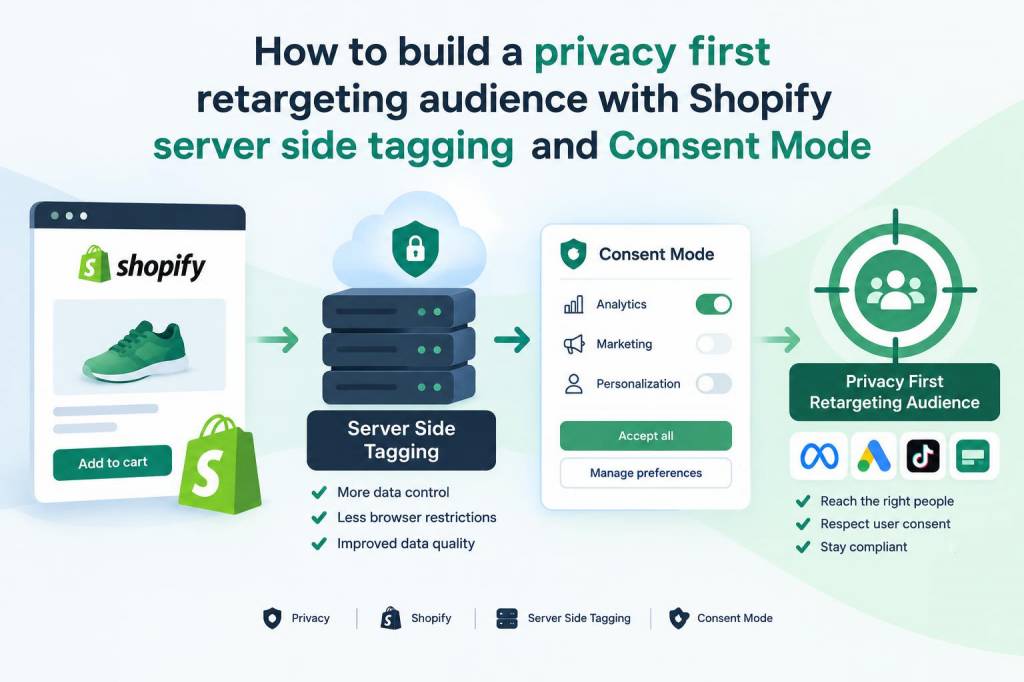
I’ve been building retargeting audiences for years, and the landscape has shifted under our feet: browsers clamp cookies, platforms limit cross-site tracking, and privacy regulations and consent banners are now central to any measurement plan. That doesn’t mean retargeting is dead — it means we need to be smarter about how we collect signals. In this piece I’ll walk through a practical, privacy-first approach to building a retargeting audience using Shopify, server-side tagging (GTM Server or a hosted container), and Consent Mode. I’ll explain what to send, how to respect user choices, and which tools are worth your time.
Why privacy-first retargeting matters
Retargeting still delivers strong ROI for many ecommerce brands, but doing it badly creates risk: you can lose customer trust, violate platform policies, or break analytics. A privacy-first approach does three things for you:
- Respects customer consent — only uses signals the user has allowed.
- Preserves measurement — uses aggregated and server-side signals to reduce data loss.
- Improves reliability — reduces dependency on third-party cookies and client-side blocking.
Core components you’ll need
At a high level, build this stack:
- Shopify storefront (Shopify Plus helps but not required).
- Server-side tagging: Google Tag Manager Server container (or a managed alternative like Segment Functions / Rudderstack, or a hosted GTM server on Google Cloud/Cloud Run).
- A consent management platform (CMP) that integrates with Consent Mode (IAB TCF-compliant CMPs, OneTrust, Cookiebot, or Shopify apps like CookiePro).
- Analytics & ad endpoints configured for server events: Google Analytics 4 (server-side), Google Ads with Consent Mode, Facebook/Meta Conversions API (CAPI).
How Consent Mode changes the game
Consent Mode (Google’s implementation) lets you indicate user consent choices to Google tags via consent signals. Instead of blocking everything when consent is denied, Consent Mode changes measurement behavior: it sends pings that have reduced precision or modeled conversions. The important part for retargeting is that it creates a standardised way to respect consent at the tag-level and enables modelling where direct signals are unavailable.
With Consent Mode v2 you can communicate granular consent states (analytics, ad_storage, ad_personalization, etc.). If a user denies ad_storage, you must not use client-side identifiers for ad targeting — but you can still use server-side aggregated signals if your CMP allows a user to opt into necessary processing.
Server-side tagging: why and how
Client-side tags run in the browser and are vulnerable to blockers and cookie restrictions. Server-side tagging moves the heavy lifting to a controlled environment. Benefits include:
- Reduced data loss from ad blockers.
- Ability to enrich events with backend data (order value, product IDs) without exposing PII in the browser.
- Better control over what’s forwarded to ad platforms, enabling consent checks before forwarding.
Set up a GTM Server container (or hosted alternative) and route all Shopify post-purchase and client events through it. I recommend running the server container on a cloud provider where you control the domain (e.g., gtm.yourdomain.com) to improve cookie scope and trust for ad platforms.
Practical setup on Shopify
Shopify events come in two useful shapes: events that happen client-side (page_view, product_view, add_to_cart) and server-side events (checkout, purchase). Here’s how I wire them up:
- Use Shopify’s Online Store theme to inject a lightweight data layer for product and page metadata. Keep it minimal — product ID, SKU, price, and content type.
- Install a client-side GTM snippet that only collects events and pushes them to your own server-side endpoint. Avoid directly firing third-party pixels from the client.
- For purchases, use Shopify’s order webhooks or post-purchase scripts to send order data server-to-server to your GTM Server container. This ensures the purchase event is sent reliably even when the browser rejects third-party cookies.
Respecting consent at every step
The CMP must sit in front of your tag logic. I take two concrete steps:
- Expose consent state to the client data layer. When the CMP loads, it pushes consent flags (analytics_storage, ad_storage) to the data layer and to the server endpoint with each event.
- Evaluate consent at the server before forwarding events to ad platforms. Your server container should have a consent check: if ad_storage is false, do not forward user identifiers (or hash them) to downstream ad endpoints.
Mapping events to audiences
When building retargeting audiences you need predictable event names and consistent identifiers. I use three audience buckets:
- Viewed product — fired on product pages with product ID and category.
- Added to cart — fired with product IDs and cart value.
- Purchased — server-side event containing order ID, items and value.
For audiences, rely on product IDs and hashed customer identifiers only if the user has given ad consent. If they haven’t, create behavioural audiences that are cookie-agnostic and rely on contextual or aggregated signals (e.g., “viewed product category X in the last 14 days” without storing persistent identifiers).
Integrating with Meta (Facebook) and Google
Meta’s Conversions API is a perfect match for server-side tagging. You can send events from your server container to Meta while respecting consent:
- Send event_name, event_time, content_ids, value, currency.
- Only include user_data (email, phone) if the customer consented to ad tracking; always hash PII before sending.
For Google, configure both GA4 server events and Google Ads conversions. Pass Consent Mode flags along. If ad_storage is denied, Google will use modelling to fill gaps but won’t allow cookie-based audience syncing for personalised adverts.
Audience strategies when consent is declined
All is not lost when users decline ad_storage:
- Use contextual retargeting: serve ads based on page content or product category rather than individual behaviour.
- Leverage first-party email remarketing: if you have an email and the user has consented to marketing emails, use that channel for personalised outreach.
- Build aggregated audiences: model lookalike audiences based on non-identifying behavioural cohorts (e.g., visitors who viewed a product range) and seed platforms with aggregated signals where permissible.
Practical checks & monitoring
Once deployed, test these things:
- Consent propagation: toggle consent and verify that client pushes and server events carry the correct consent flags.
- Data fidelity: check that product IDs, values and currency come through intact on server events.
- Ad endpoints: ensure Meta CAPI and Google Ads receive events only when consent allows; verify hashed PII is used appropriately.
Trade-offs and things I watch out for
There are trade-offs to this privacy-first approach:
- Increased complexity and hosting costs for server containers.
- Potential latency if server tagging isn’t optimised — use caching and async forwarding.
- Modelling and aggregated signals are not a one-to-one replacement for deterministic IDs; expect some drop in precision.
For me the benefits (resilience against blockers, better control over PII, and stronger alignment with privacy law) outweigh the costs, especially for mid-size and enterprise storefronts.
Quick reference mapping
| Event source | Where it runs | Consent check | Example destinations |
| Product View | Client → Server | Check ad_storage for forwarding user identifiers | GA4 (server), Google Ads, Meta CAPI |
| Add to Cart | Client → Server | Check analytics_storage/ad_storage | GA4, internal analytics, ad platforms (if consent) |
| Purchase | Shopify webhook → Server | Check marketing consent & PII consent | GA4, Google Ads conversions, Meta CAPI, CRM/email |
If you want, I can draft a step-by-step GTM Server container recipe for Shopify (including example trigger and tag logic) or review a current implementation and point out gaps. Tell me what platform you host the server container on and which CMP you’re using, and I’ll tailor the next piece to your stack.