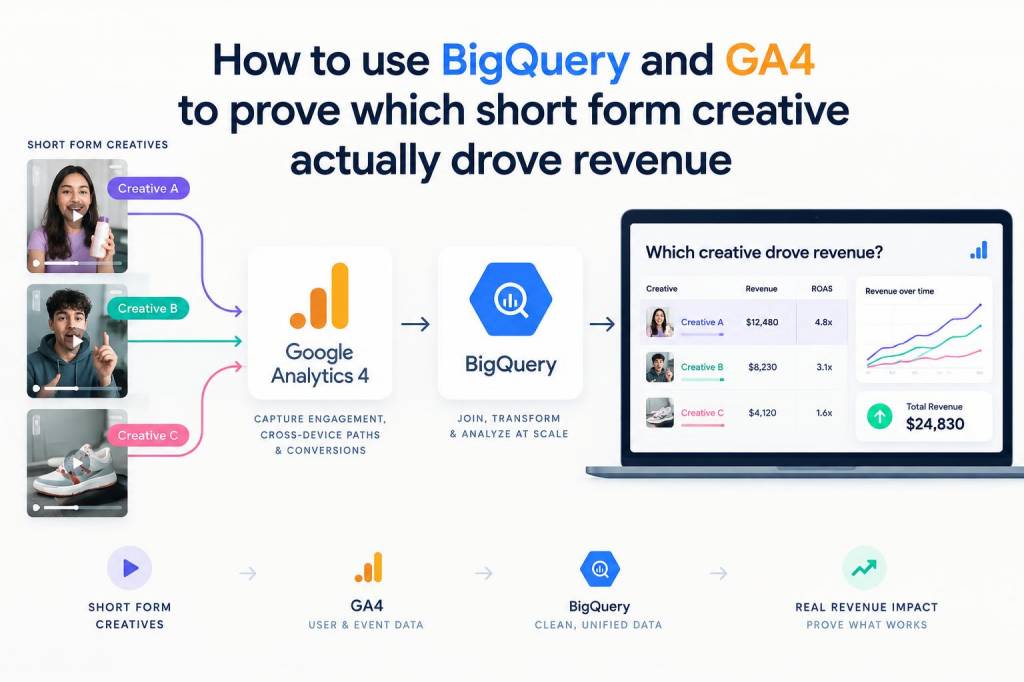
I want to show you a practical way to answer a question I get a lot from marketers and creators: when you run multiple short-form videos or reels, how do you prove which creative actually drove revenue? GA4 + BigQuery gives you the raw data to make a defensible, auditable case — if you set up tracking and queries the right way. Below I walk through the measurement design, the SQL patterns I use, and the caveats to keep in mind.
Why BigQuery + GA4?
Short answer: GA4 captures event-level data, and BigQuery gives you full access to that event stream so you can stitch impressions, creative identifiers and ecommerce events together. GA4’s UI and sampled reports aren’t designed for multi-touch creative analysis at scale — BigQuery is.
What I like about this approach:
- Event-level granularity: you can see every event with timestamps and parameters.
- Flexible attribution logic: test first-touch, last-touch, time-decay or custom multi-touch models in SQL.
- Auditability: queries are repeatable and can be versioned; you can inspect raw events that led to revenue attribution.
Tracking basics you must have in place
If your GA4 export is missing the creative identifier you planned to analyze, no SQL wizardry will help — instrumentation matters. Here’s what I always ensure is in place before trusting BigQuery analysis:
- Creative identifier parameter — a small parameter you populate on click-through URLs or when logging the ad event (e.g., creative_id, creative_name, creative_variant). Include it in the landing page URL as a query param (e.g., ?creative_id=vidA_v2) or push it to GA4 via gtag/gtm as an event parameter.
- Click/impression capture: capture the click event (or impression if you can) with that creative_id so you can tie a user session to the creative they clicked.
- Consistent conversion event — ensure your purchase (or conversion) fires a consistent event name like "purchase" with value or purchase_revenue parameter populated.
- UTM + creative param hygiene: avoid overwriting source/medium UTMs during redirects; keep creative_id separate.
How I model creative → revenue in BigQuery
Conceptually, I join the first event where we saw a creative_id for a user/session to later purchase events for that user within a chosen window (commonly 7 or 28 days). That gives a simple, transparent first-touch attribution. Then I layer in alternative models (last-touch, weighted multi-touch) for comparison.
Key fields from GA4 export (events_* tables):
| Field | Meaning |
|---|---|
| event_date / event_timestamp | When the event occurred |
| user_pseudo_id | GA4 client-level anonymized user id |
| event_name | Event type (e.g., page_view, click, purchase) |
| event_params | Array of key/value params (creative_id, value, currency...) |
| user_properties | User-scoped properties |
Example: first-touch attribution SQL pattern
Below is a simplified pattern I use. It finds the first recorded creative touch for a user, then sums any purchases for that user within 28 days. Replace event table names and param keys to match your export.
Notes: I use SAFE offsets for arrays, and UNNEST on event_params to extract creative_id and purchase_value.
-- 1) get first creative touch per userWITH first_creative AS ( SELECT user_pseudo_id, MIN(event_timestamp) AS first_touch_ts, (SELECT value.string_value FROM UNNEST(event_params) WHERE key='creative_id') AS creative_id FROM `yourproject.analytics_XXXXXXXX.events_*` WHERE _TABLE_SUFFIX BETWEEN '20240101' AND '20240131' AND (SELECT value.string_value FROM UNNEST(event_params) WHERE key='creative_id') IS NOT NULL GROUP BY user_pseudo_id, creative_id),-- 2) get purchases per user with timestamp and valueuser_purchases AS ( SELECT user_pseudo_id, event_timestamp AS purchase_ts, (SELECT value.double_value FROM UNNEST(event_params) WHERE key='value') AS purchase_value FROM `yourproject.analytics_XXXXXXXX.events_*` WHERE event_name='purchase' AND _TABLE_SUFFIX BETWEEN '20240101' AND '20240131'),-- 3) join purchases to first creative if within windowattributed AS ( SELECT f.creative_id, p.purchase_value FROM first_creative f JOIN user_purchases p ON f.user_pseudo_id = p.user_pseudo_id AND p.purchase_ts BETWEEN f.first_touch_ts AND f.first_touch_ts + 28*24*60*60*1000000)SELECT creative_id, COUNT(*) AS purchases, SUM(purchase_value) AS revenue, AVG(purchase_value) AS avg_order_valueFROM attributedGROUP BY creative_idORDER BY revenue DESC;
This gives you a table of creatives ranked by attributed revenue (first-touch, 28-day window).
Comparing attribution models
I rarely stop at a single model. Creative often influences purchase through multiple touchpoints — someone might view three creatives across channels before buying. I usually run:
- First-touch — credit the creative that first brought the user
- Last-touch — credit the creative immediately prior to purchase
- Equal-weight multi-touch — split revenue across all creatives seen within window
- Time-decay — more weight to recent touches (a half-life decay)
Time-decay or multi-touch require you to collect each creative exposure per user (impressions + clicks). In SQL you can enumerate the user's creative events within the window and apply weights before summing revenue fractions.
Practical enhancements I use
- Session stitching: if you want session-context attribution, use session_id (if available) or group by a combination of user_pseudo_id and session_start timestamps.
- Channel context: include traffic_source parameters (campaign, source_medium, platform) to separate paid social vs organic distribution.
- Deduplicate bots and test traffic: filter by user_properties or known test client ids to avoid skew.
- Confidence intervals: run bootstrap or compute standard errors when you compare creatives; don’t rely solely on point estimates.
- Visualizations: export results to Looker Studio or Data Studio and include funnels and cohort analyses per creative.
Common pitfalls and how I avoid them
Here are mistakes I see often and the pragmatic fixes I recommend:
- Missing creative params: fix at source — update ad URLs or GTM variables to include creative_id. If retroactive data is missing, you can only analyze from the fix date forward.
- Over-attribution to channel: ads and organic shares interact. Use experiments or holdout audiences to isolate impact where possible.
- Cross-device tracing: GA4 user_pseudo_id is device-level. If you need cross-device accuracy, implement user_id (logins) and join on that.
- Attribution window blind spots: choose windows that reflect your sales cycle — short for impulse purchases, longer for considered buys.
What to present to stakeholders
Stakeholders want a clear story and enough provenance to trust the numbers. I typically deliver:
- Top-line table: creative_id, impressions, clicks, purchases, revenue, revenue per 1,000 impressions
- Model comparison: revenue under first-touch vs last-touch vs multi-touch
- Data quality notes: date range, filtering steps, % of purchases attributable to creatives in dataset
- Actionable recommendation: e.g., scale creative X on platform Y, pause variant Z, or run an A/B test for the top two creatives
Final practical checklist before you run the analysis
- Do you capture creative_id on click/impression? If not, implement and wait for data.
- Are purchase events reliably tracked with revenue value? Audit sample transactions in BigQuery.
- Decide attribution window and model(s) to test.
- Filter out test traffic and bots.
- Validate results with a business sanity check — e.g., compare attributed revenue to sales reported in backend within reason.
If you want, I can share a slightly more advanced template that includes time-decay weighting and a per-user creative exposure timeline. Tell me which attribution model you care about and whether your creatives are captured in URL params or event parameters — I’ll tailor the SQL to your schema.