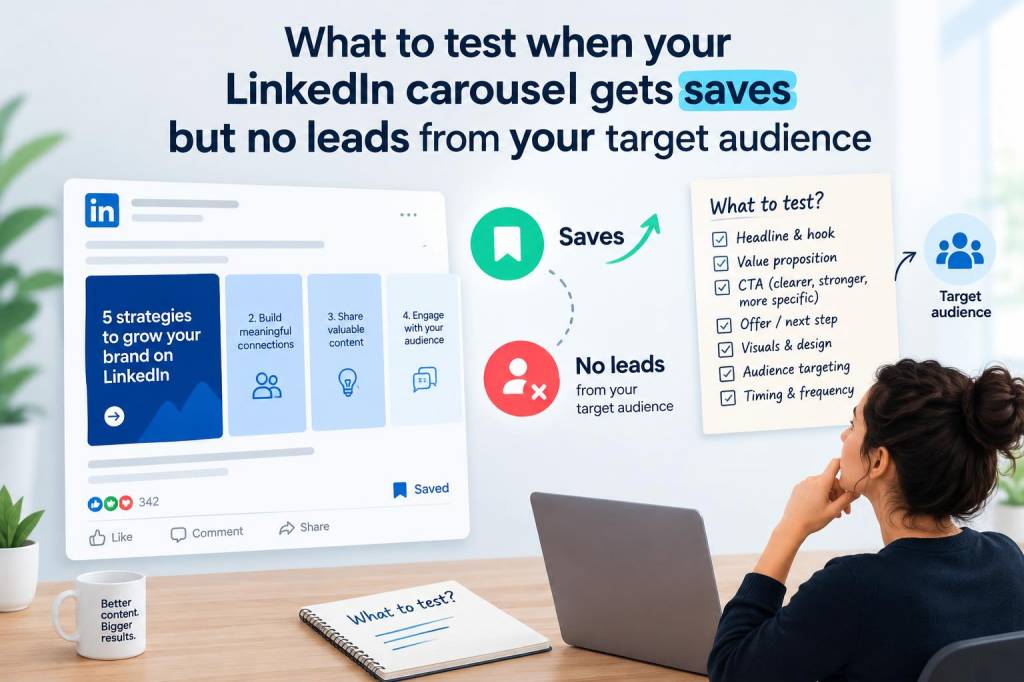
I have seen this pattern more than once: a LinkedIn carousel earns strong saves, a healthy amount of impressions, even a few thoughtful comments, yet leads stay flat. For a while, that can feel encouraging because saves signal value. But if my target audience is saving the post and still not taking the next step, I treat that as a signal to test, not celebrate.
When I audit this kind of post, I start from a simple question: what exactly is being saved? Sometimes people save a carousel because it is visually tidy, easy to skim, or packed with useful concepts. That does not always mean it is convincing enough to move someone toward a call, a landing page, a message, or a purchase. In other words, saved content can be educational without being commercially useful.
I have learned to separate attention value from conversion value. A carousel can do a great job of earning attention from the right people, but still fail to create intent. If that happens, I do not immediately blame the offer. I test every layer around the post: audience fit, hook, message, structure, CTA, and follow-up path.
Start by checking whether saves are coming from real buyers
The first thing I test is audience quality. A post can attract broad interest from people who like the topic, not necessarily people who need what I sell. On LinkedIn, that happens often because useful educational content gets saved by peers, students, junior marketers, and curious professionals who are not in buying mode.
I look at profile views, job titles, company size, seniority, and industry among the people who engage. If the post attracts a lot of engagement from people outside my target customer profile, then the post may be strong content but weak lead content. That is not a failure, but it changes what I do next.
I usually test audience fit by publishing two similar carousels with a sharper angle in one version. For example, instead of writing for “marketers,” I write for “in-house B2B marketing managers at SaaS companies with small teams.” That level of precision often reduces vanity engagement and increases qualified clicks or replies.
Test whether the hook promises education instead of action
A lot of carousels get saved because the opening promise is broad and useful. That sounds good, but broad utility can attract passive interest. If my first slide sounds like a mini lesson, people may save it for later and move on. If I want leads, I need a hook that speaks to a painful, urgent, or expensive problem.
I test alternate openings that do one of three things:
For example, a weak opening might say, “Five ways to improve your LinkedIn content.” A stronger opening might say, “If your LinkedIn posts attract saves but not sales calls, your carousel may be teaching too much and selling too little.” That second version narrows the context and invites self-identification from the right reader.
I also test emotional tone. A calm educational tone is useful, but a more opinionated opening often creates better lead intent. Not because drama sells everything, but because a strong point of view filters for relevance.
Test whether each slide creates momentum or just information
Many carousels are structured like slide decks, not like persuasion assets. They explain, define, and expand, but they do not move the reader toward a decision. That is a major reason why saves and leads diverge.
When I review my own carousels, I ask whether each slide earns the next one. If a slide adds information without increasing curiosity or urgency, it may be creating friction. People save it because it feels useful, but they do not feel compelled to act.
I test for momentum by changing the order of the slides. I may move the strongest insight earlier, remove one explanatory slide, or turn one slide into a short proof point. I also reduce excessive detail. Too much dense information can make a carousel feel complete enough that the reader thinks, “Useful,” and stops there.
What often works better is a structure like this:
That kind of flow gives the reader a reason to keep going, rather than just a reason to save.
Test whether my CTA matches buyer intent
If a carousel gets saves but no leads, I always inspect the call to action. A CTA that asks for too much too soon can kill response. A CTA that asks for too little may not create any lead path at all.
I test three different CTA types:
Sometimes the issue is that I am sending a cold reader straight into a high-friction step. That works only if the post has already built enough trust and specificity. If not, I need an intermediate step. A simple DM prompt, a gated checklist, or a comment-based trigger can work better than a direct sales link.
I also test CTA placement. On LinkedIn, I often get better response when I place a soft CTA inside the post text and a more direct CTA in the final slide. That gives interested readers two chances to act.
Test whether I am selling too late
One mistake I have made is waiting until the final slide to reveal anything commercial. If every slide feels like neutral education, people may consume the value and leave without connecting it to my offer. In that case, the post is useful, but not positioned as a bridge to a solution.
I now test earlier commercial framing. That does not mean pitching hard from slide one. It means connecting the content to a problem my product, service, or offer solves. I may mention a common workflow issue, a missed revenue opportunity, or a repeated team bottleneck before the CTA even appears.
This is especially important when I am speaking to a target audience that already understands the topic. They do not need another generic lesson. They need to see how a specific problem maps to a specific outcome.
Test the offer, not only the post
Sometimes the carousel is fine and the offer is vague. That happens when I promote something that sounds useful but does not feel concrete enough to act on. If the audience cannot immediately tell what they get, who it is for, and why it matters now, they may save the post and never follow through.
I test offer clarity by tightening three points:
For example, “strategy support” is vague. “A 30-minute content teardown for B2B founders whose LinkedIn posts get engagement but no pipeline conversations” is much clearer. The second version gives the reader a reason to self-select.
I also test whether the offer feels low risk. If people are not ready to book a call, I might offer a short checklist, a benchmark sheet, or a lightweight diagnostic instead. That keeps the lead path alive without forcing commitment too early.
Test whether trust signals are visible enough
People may save a carousel because it sounds smart, but still hesitate to contact me if they do not see enough trust signals. LinkedIn is crowded with advice, and readers often need more than a clever post before they reach out.
I check whether my content includes proof. That might be a brief client result, a process I have used, a common pattern I have observed, or a practical example that shows I have done the work. A carousel can still be educational, but it needs enough credibility to make the next step feel safe.
I also test whether my profile supports the post. If the carousel is strong but my headline, featured section, or about section do not match it, I lose people after they click through. A post that performs well should connect cleanly to a profile that explains who I help and what I do.
What I compare when a carousel saves well but converts poorly
| Element | What I test | What I look for |
|---|---|---|
| Audience fit | Broader vs narrower targeting | More qualified viewers and profile visits |
| Hook | Educational vs urgent opening | More relevance from target buyers |
| Slide flow | Information density and order | More momentum and less passive saving |
| CTA | Soft vs direct action request | More replies, DMs, or clicks |
| Offer clarity | Vague vs specific solution | More self-selection from the right readers |
| Trust signals | Proof and profile alignment | More comfort with taking action |
Test the follow-up after the save
I do not treat the save as the final signal. If someone saves my carousel, I want a path that turns that intent into a conversation. That may mean replying to comments quickly, sending a direct message to people who asked relevant questions, or repurposing the same idea into a post with a stronger CTA a few days later.
I also watch for repeated behavior. If the same topic earns saves but not leads, I do not assume the topic is wrong. I assume I have not yet found the right conversion angle. That is a useful distinction because it keeps me from abandoning strong subject matter too early.
When I keep testing with this mindset, I usually discover one of a few things: I am attracting the wrong segment, my hook is too educational, my CTA is too weak, or my offer is too abstract. Once I know which lever is weak, I can adjust the carousel and the surrounding funnel instead of guessing.